Improvements:
- We've enhanced the integration between Azuga ELD and Azuga Fleet to automatically synchronize driver to vehicle associations when a driver completes a DVIR in ELD.
- We've enhanced input validation across the application to ensure user provided data is properly validated before being processed or stored. This helps prevent unexpected or potentially unsafe input from affecting application functionality or business logic.
- We've enhanced file upload validation to ensure uploaded files meet the required type and security criteria before they are accepted. This helps prevent potentially unsafe or malicious files from being uploaded and improves the overall security of the application.
- We've improved the calculation and display of Shift Remaining time in the Driver Portal to ensure it remains accurate and consistent with the Azuga Driver app during off-duty periods.
- We've enhanced the default sorting experience across several key Fleet Management pages to help users access the most relevant operational data more quickly. Previously, users often had to manually sort tables to view the latest records, resulting in additional clicks and slower navigation.
- Improved localization for the Mileage by State and State Mileage Audit reports to ensure report content is consistently translated when users select French or Spanish as their application language.
- Strengthened the localization experience across key HOS reporting workflows by reviewing and completing English, French, and Spanish translations for Fuel Summary, Fuel & Mileage (IFTA), DVIR Defects, and Driver/Vehicle Segment reports. Existing report templates were reviewed to ensure visible content consistently uses the appropriate translated values instead of falling back to hardcoded English text.
- Introduced complete English, French, and Spanish localization support for the Uncertified Logs and Certified Logs Summary reports. These reports previously contained hardcoded English text in their Jasper templates, preventing the report content from adapting when users selected a different application language.
Deep Dive
Driver Association Sync Between ELD and Fleet
We've enhanced the integration between Azuga ELD and Azuga Fleet to automatically synchronize driver to vehicle associations when a driver completes a DVIR in ELD.
Previously, customers using Azuga Fleet and Azuga ELD could experience a gap when ELD was used primarily for DVIR workflows. Although drivers were required to identify the vehicle they were operating while completing a DVIR, this information was not always reflected in Fleet, resulting in inconsistent driver and vehicle associations across the two products.
With this enhancement, the driver and vehicle information captured during a completed DVIR is now automatically synchronized with Azuga Fleet, helping customers maintain consistent driver to vehicle information across both systems.
What’s New
1. Driver and Vehicle Identification During DVIR
When completing a DVIR in Azuga ELD, the driver identifies the vehicle they are driving as part of the inspection process. The system captures:
- Driver name – The driver completing the DVIR.
- Vehicle – The vehicle identified by the driver during the inspection.
2. Automatic Driver Association Sync
Once the DVIR is submitted, the driver and vehicle information captured during the inspection is used to update the corresponding Driver association in Azuga Fleet. This eliminates the need for customers to manually establish the same association separately in Fleet.
3. Consistent Information Across ELD and Fleet
The synchronized association helps ensure that the driver-to-vehicle relationship captured through the ELD DVIR workflow is reflected consistently in Fleet. This is particularly useful for customers who use Azuga ELD primarily for DVIRs, where the driver may not otherwise establish a vehicle association through the regular Fleet workflow.
How It Works
- The driver starts and completes a DVIR in Azuga ELD.
- The driver identifies the vehicle they are operating during the inspection.
- The driver submits the completed DVIR.
- Azuga captures the driver and vehicle information associated with the inspection.
- The Driver association is automatically synchronized with Azuga Fleet.
- Fleet users can access the updated driver to vehicle association without requiring additional manual updates.
Benefits
- Consistent Driver Associations: Keeps driver and vehicle association information aligned across Azuga ELD and Fleet, providing a more consistent view of fleet operations.
- Reduced Manual Effort: Eliminates the need for customers to manually establish the same driver-to-vehicle association in Fleet after completing a DVIR in ELD.
- Improved Data Accuracy: Uses the driver and vehicle information captured directly during the DVIR to update Fleet, helping reduce discrepancies between the two systems.
- Better Support for DVIR Only ELD Usage: Customers using Azuga ELD primarily for DVIR workflows can now benefit from automatic synchronization even when drivers are not actively pairing with vehicles through Fleet.
- Improved Operational Visibility: Fleet users can rely on more up-to-date driver-to-vehicle information, making it easier to understand which driver is associated with which vehicle across their fleet.
- Seamless Fleet and ELD Experience: Bridges the gap between the ELD inspection workflow and Fleet management, creating a more connected experience for customers using both products.
Improved Input Validation
We've enhanced input validation across the application to ensure user-provided data is properly validated before being processed or stored. This helps prevent unexpected or potentially unsafe input from affecting application functionality or business logic.
What’s New
- Enhanced Input Validation: The application now validates user input against expected formats and requirements before accepting it.
- Improved Data Handling: Invalid, malformed, or unsupported input is identified before it is processed or stored.
- Strengthened Security: Additional validation controls help reduce security risks associated with improperly handled user input.
Benefits
- Improved Security – Helps protect against potentially unsafe input.
- Better Data Integrity – Ensures submitted information meets expected requirements.
- Reliable Application Behavior – Reduces issues caused by malformed or unexpected data.
- Safer User Experience – Provides more controlled and consistent input handling.
Enhanced File Upload Validation
We've enhanced file upload validation to ensure uploaded files meet the required type and security criteria before they are accepted. This helps prevent potentially unsafe or malicious files from being uploaded and improves the overall security of the application.
What’s New
- Improved File Validation: Uploaded files are now validated against supported file types and expected requirements before processing.
- Enhanced Security Controls: Additional validation helps prevent potentially malicious or inappropriate files from being accepted through file upload workflows.
- Safer File Handling: Uploaded files are processed with improved security checks to reduce risks associated with unrestricted file uploads.
Benefits
- Improved Security – Reduces risks associated with malicious file uploads.
- Better File Integrity – Ensures uploaded files meet expected requirements.
- Safer File Management – Provides more secure handling of user-uploaded documents.
- Reduced Attack Risk – Helps protect against potential misuse of uploaded files.
Improved Shift Remaining Time Accuracy
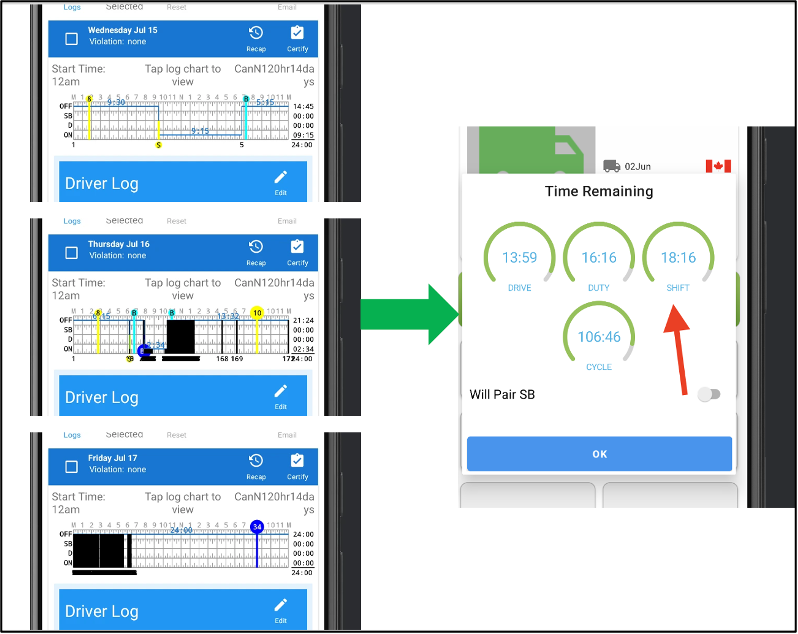
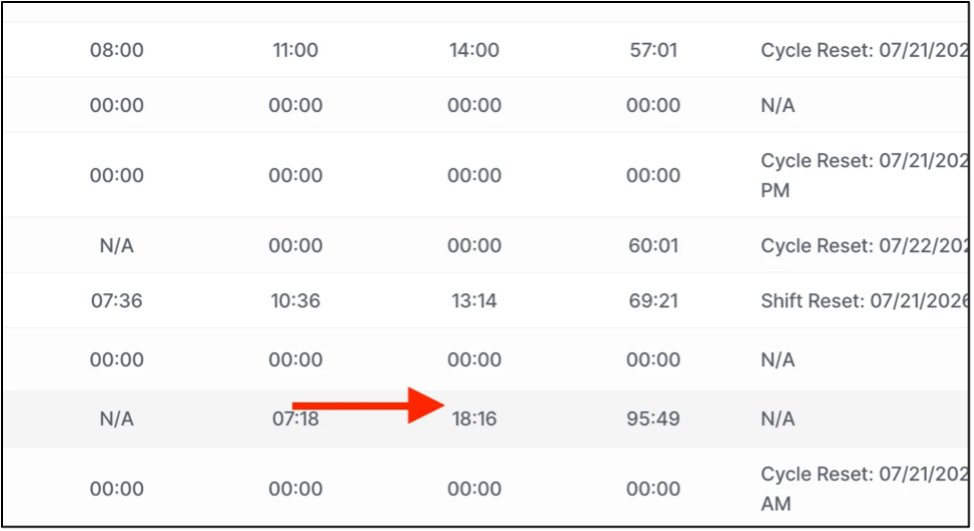
We've improved the calculation and display of Shift Remaining time in the Driver Portal to ensure it remains accurate and consistent with the Azuga Driver app during off-duty longer periods.
Previously, under certain Canadian Hours of Service cycles, the Shift Remaining time shown in the portal could continue to decrease even while the driver was off duty. This resulted in a discrepancy between the portal and the driver's mobile application. With this update, the portal now correctly maintains the remaining shift time while the driver is off duty, ensuring a consistent view of available driving hours across both platforms.
What’s Changed
Accurate Shift Remaining Calculations During Off-Duty Status:
The Driver Portal has been updated to correctly calculate Shift Remaining time based on the driver's current duty status. When a driver is Off Duty, the remaining shift time nocontinues to count down unnecessarily. Instead, the portal now preserves the available shift time until the driver resumes activities that consume shift hours.
This aligns the portal's behavior with the Azuga Driver app and ensures drivers and fleet managers are viewing the same Hours of Service information.
Key Benefits
- Improves the accuracy of Shift Remaining calculations.
- Ensures consistent Hours of Service information across the Driver app and the Portal.
- Eliminates discrepancies between mobile and portal displays during off-duty periods.
- Provides fleet managers with more reliable remaining hours information for driver planning and compliance monitoring.
- Enhances confidence in Hours of Service data by ensuring calculations accurately reflect the driver's current duty status.
Enhanced Default Sorting Across React Pages
We've enhanced the default sorting experience across several key Fleet Management pages to help users access the most relevant operational data more quickly. Previously, users often had to manually sort tables to view the latest records, resulting in additional clicks and slower navigation.
With this enhancement, supported pages now automatically display the most recent records first when opened. In addition, new column sorting capabilities have been introduced on select pages, enabling users to organize information based on their operational needs.
What's New
1. Automatic Latest First Sorting:
The following pages now automatically display the latest records when first opened:
- Violations – Displays the latest violations first.
- Unidentified Driving – Displays the most recent unidentified driving events first.
- Vehicle Daily Usage Report – Automatically sorts records by the Date and Time column in descending order, ensuring the latest vehicle activity appears first.
- Malfunctions & Data Diagnostics – Displays the most recent malfunction and diagnostic events first.
- Fuel Receipts – Displays the latest fuel transactions first.
2. Expanded Sorting Capabilities
Additional sortable columns have been introduced to simplify data analysis and navigation:
- Violations, Fleet managers can now sort records by:
- Date
- Driver
- Unidentified Driving Sorting is now available for:
- Date & Time
- Vehicle
- Fuel Receipts the Fuel Receipts page now supports sorting by:
- Date & Time
- Driver
- Vehicle
These enhancements make it easier to quickly locate recent records or organize data based on operational requirements.
Benefits:
1. Faster Access to Recent Activity
The latest operational records are displayed automatically when users open supported pages, reducing the need for manual sorting and helping fleet managers focus on current information.
2. Improved Data Navigation
New sorting options allow users to organize records by key attributes such as date, driver, and vehicle, making it easier to analyze operational data.
3. Consistent User Experience
A standardized default sorting behavior across multiple Fleet Management pages provides a more intuitive and predictable navigation experience.
4. Increased Operational Efficiency
By reducing manual interactions and surfacing the most relevant information first, fleet managers can review violations, unidentified driving events, diagnostics, fuel receipts, and vehicle usage more efficiently.
5. Better Decision Making
Quick access to the latest operational data enables fleet managers to respond faster to compliance issues, vehicle events, and daily fleet activities.
Complete French and Spanish Translations for Mileage Reports
Improved localization for the Mileage by State and State Mileage Audit reports to ensure report content is consistently translated when users select French or Spanish as their application language.
What's New
- Mileage by State: Completed missing French and Spanish translations for report titles, descriptions, vehicle and state details, odometer values, mileage information, and other report labels across the standard, state-grouped, and vehicle-grouped views.
- State Mileage Audit: Verified and updated report labels to ensure all supported content is properly parameterized and translated based on the selected language.
- Consistent Report Localization: Validated the report templates and translations to prevent English text from appearing in French or Spanish PDFs.
- Language Validation: QA coverage includes Mileage by State reports with state and vehicle groupings and State Mileage Audit reports across English, French, and Spanish.
Customers can now generate mileage related HOS reports in their selected language, providing a more consistent and localized reporting experience.
Enhanced Localization Across HOS Reports
Strengthened the localization experience across key HOS reporting workflows by reviewing and completing English, French, and Spanish translations for Fuel Summary, Fuel & Mileage (IFTA), DVIR Defects, and Driver/Vehicle Segment reports. Existing report templates were reviewed to ensure visible content consistently uses the appropriate translated values instead of falling back to hardcoded English text.
What's New
- Fuel & Mileage Reports: Validated the Fuel Summary and Fuel & Mileage (IFTA) reports to ensure report titles, headers, and other visible labels are correctly translated across English, French, and Spanish.
- DVIR Defects Report: Removed remaining hardcoded English fallback text from the DVIR Defects report, ensuring labels such as reporting periods are displayed using the appropriate language specific translations.
- Driver/Vehicle Segment Report: Verified the Driver/Vehicle Segment report to ensure all visible titles, headers, and labels correctly switch based on the selected application language.
- Consistent Localization Across Reports: Completed translation gaps and validated report output across all three supported languages. Each report was reviewed through generated PDFs to ensure users receive a fully localized experience without unexpected English text when French or Spanish is selected.
Now users can generate a more consistent set of Fuel, IFTA, DVIR, and Driver/Vehicle Segment reports in their preferred language, reducing language inconsistencies and improving the overall localized reporting experience.
Multilingual Support for Log Summary Reports
Introduced complete English, French, and Spanish localization support for the Uncertified Logs and Certified Logs Summary reports. These reports previously contained hardcoded English text in their Jasper templates, preventing the report content from adapting when users selected a different application language.
What's New
- Uncertified Logs Report: Added the required translation framework for the Uncertified Logs report, including localized report titles, column headers, reporting period information, page markers, and other user visible labels. The Jasper template was updated to consume translation parameters instead of displaying fixed English text.
- Certified Logs Summary Report: Applied the same localization framework to the Certified Logs Summary report, ensuring titles, status information, dates, reporting periods, and other visible content are driven by language specific translation values.
- Template and Translation Alignment: Added the new report translation keys to the English, French, and Spanish translation files and updated all applicable copies of the Jasper templates across the reporting modules. The templates were also recompiled to ensure the localized report definitions are available in the generated Jasper files.
- End-to-End Localization Validation: Validated the generated PDFs in English, French, and Spanish to confirm that changing the report language updates the report content correctly and that no user-visible English text remains when French or Spanish is selected.
Now users can generate Uncertified Logs and Certified Logs Summary reports in their preferred language, delivering a consistent multilingual reporting experience across log summary workflows.
For bug fixes refer to the pdf: [Customer] ELD Web Release Notes - September 2026.pdf
Was this article helpful?
That’s Great!
Thank you for your feedback
Sorry! We couldn't be helpful
Thank you for your feedback
Feedback sent
We appreciate your effort and will try to fix the article