Improvements:
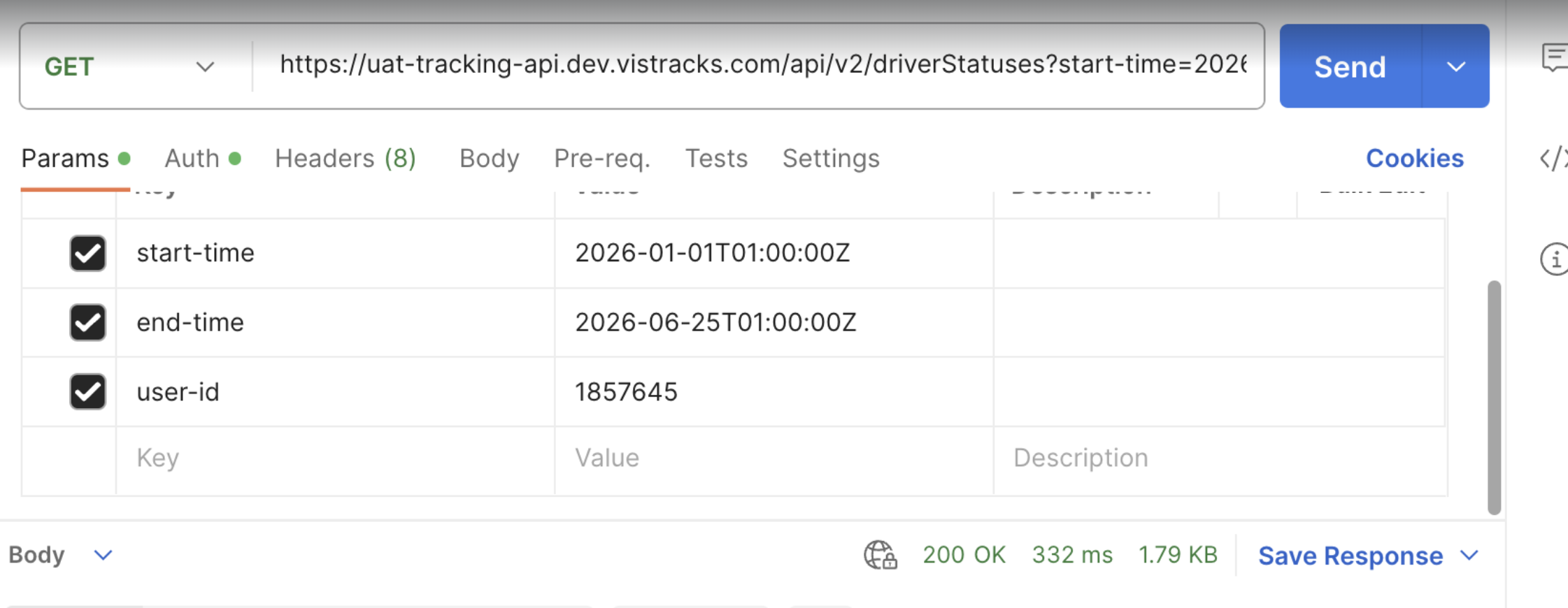
- We've enhanced the Driver Statuses API to support filtering records by event time and driver ID, making it easier for integrations to retrieve driver status data for specific periods and drivers.
- We've enhanced the Driver Vehicle Inspection Report (DVIR) reporting experience to make it easier to retrieve inspection records for multiple vehicles at once.
- Enhanced trailer handling logic in Pre Trip and Post Trip DVIR alerts to provide a more accurate and relevant inspection experience.
Driver Status API Enhanced Filtering Capabilities
We can now retrieve driver status records for specific drivers and within a defined event time range, enabling more efficient synchronization processes and reducing the need to process large volumes of historical data.
What’s New
The Driver Statuses API now supports the following optional query parameters:
Parameter | Type | Description |
driver-id | String/List | Returns records for one or more specified drivers. |
start-time | ISO 8601 Datetime | Returns records with an event time on or after the specified timestamp. |
end-time | ISO 8601 Datetime | Returns records with an event time before the specified timestamp. |
Time Filter Behavior:
The API supports several filtering scenarios:
Parameters Provided | Result |
start-time and end-time | Returns records where the event time falls within the specified range. |
start-time only | Returns records with event times greater than or equal to the specified value. |
end-time only | Returns records with event times earlier than the specified value. |
Neither parameter | Returns records based on existing API behavior without time based filtering. |
Why This Matters
Many integrations consume driver status data on a recurring basis to support:
- Driver activity monitoring
- Compliance and operational reporting
- External workforce management systems
- Data warehousing and analytics platforms
- Incremental synchronization processes
Previously, integrations often needed to retrieve a broader dataset and perform additional filtering downstream. With the introduction of event time filtering directly within the API, customers can now request only the records relevant to a specific synchronization window or reporting period.
Key Benefits
1. Improved Integration Efficiency: Retrieve only the records required for a given time period, reducing unnecessary API payloads and processing overhead.
2. Simplified Incremental Data Sync: Integrations can use a rolling time window to retrieve newly created or updated driver status records, making scheduled synchronization jobs easier to implement and maintain.
3. Faster Data Processing: Filtering at the API level reduces the volume of data that must be transferred, stored, and processed by external systems.
4. Flexible Querying: Time based filtering can be combined with existing Driver Status API filters, including driver, asset, active status, sorting, pagination, and other supported query parameters.
Enhanced DVIR Reporting with Bulk Export by Vehicle
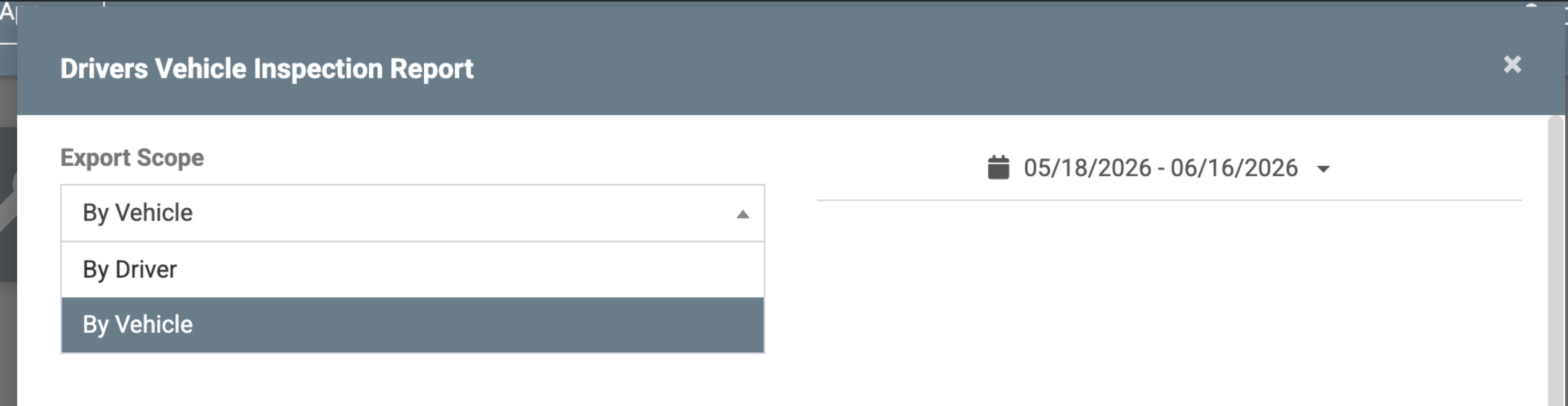
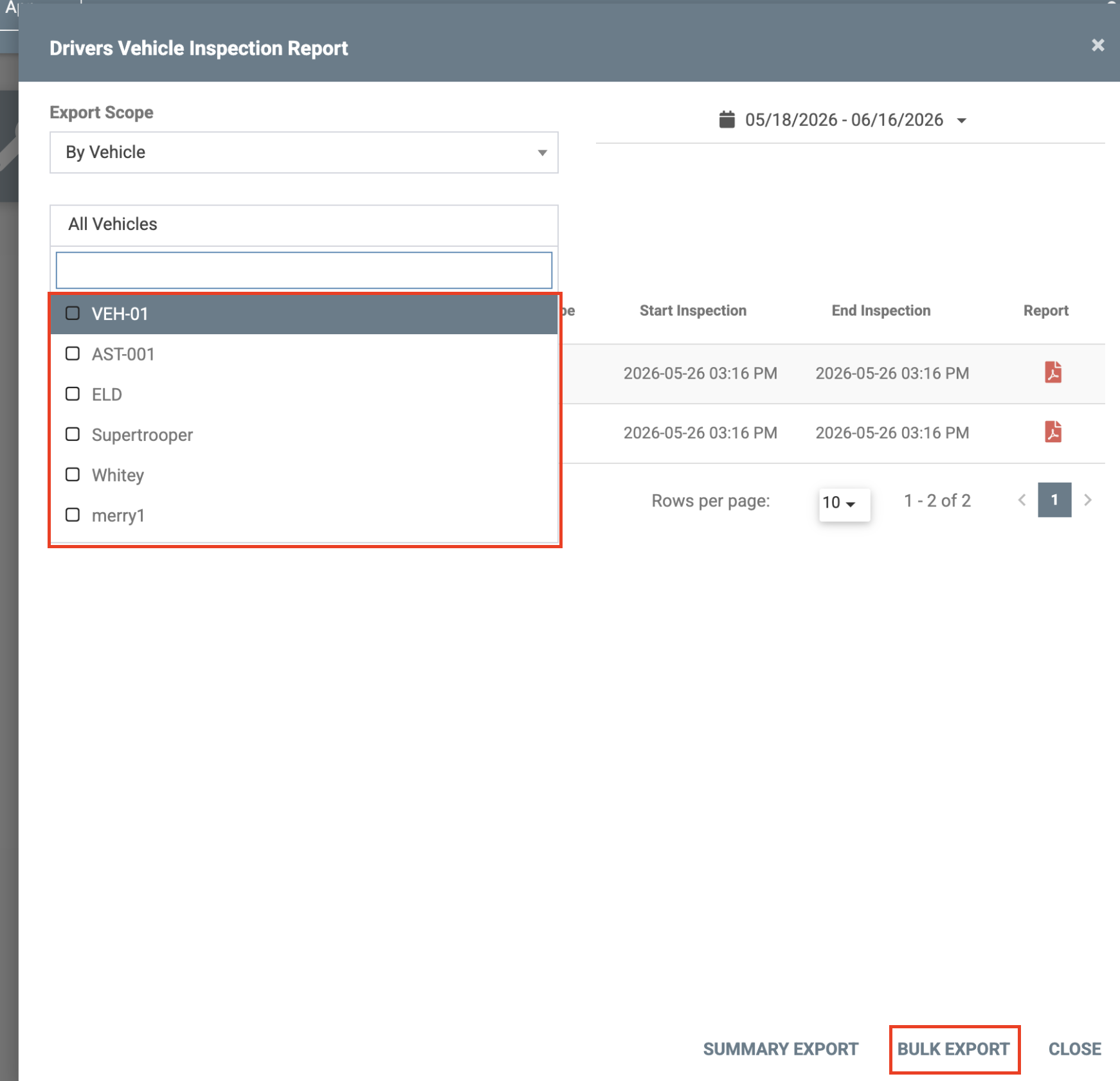
Previously, users could review DVIR reports individually, which could be time consuming when managing large fleets. With this enhancement, fleet administrators can now select one or more vehicles and generate bulk exports of DVIR reports within a specified date range.What's New
Bulk Export by Vehicle:
- Select By Vehicle as the export scope.
- Choose one or multiple vehicles from the vehicle selection list.
- Specify a reporting period using the date range filter.
- Export DVIR reports for all selected vehicles in a single action.
Benefits
1. Vehicle Based DVIR Reporting
Enables fleet administrators to generate DVIR reports based on vehicle selection, providing an asset- centric view of inspection records in addition to existing driver-based reporting.
2. Improved Operational Efficiency
Reduces administrative effort for fleet managers responsible for reviewing and maintaining DVIR documentation across multiple vehicles.
3. Simplified Compliance Management
Provides a convenient way to retrieve inspection records for multiple assets during regulatory audits or internal compliance reviews.
4. Better Fleet Visibility
Allows organizations to analyze inspection activity across groups of vehicles within a selected time period.
Improved Trailer Display in Pre Trip and Post Trip DVIR Alerts
Previously, alerts could display both the vehicle name and trailer names, and in some scenarios, trailers that were previously connected continued to appear after a disconnect and reconnect cycle. This could make it difficult for drivers to identify which trailers actually required inspection.
With this update, DVIR alerts now display only the trailers that are currently relevant to the inspection workflow. When new trailers are added after a disconnect/reconnect event, the PreTrip and PostTrip alerts will show only those newly added trailers along with their associated remarks. Vehicle names and previously connected trailers that are not part of the current inspection context are excluded.
This improves the accuracy of trailer inspection notifications, reduces driver confusion, and ensures that DVIR alerts reflect the current trailer configuration more reliably.
PDF Version: [Customer] ELD Web Release Notes - June 2026.pdf
Was this article helpful?
That’s Great!
Thank you for your feedback
Sorry! We couldn't be helpful
Thank you for your feedback
Feedback sent
We appreciate your effort and will try to fix the article