The latest firmware update 20260407_1111-1.5 for Next-Gen SafetyCam Plus and Pro devices.
Key Improvements in This Release:
Request Video Improvements:
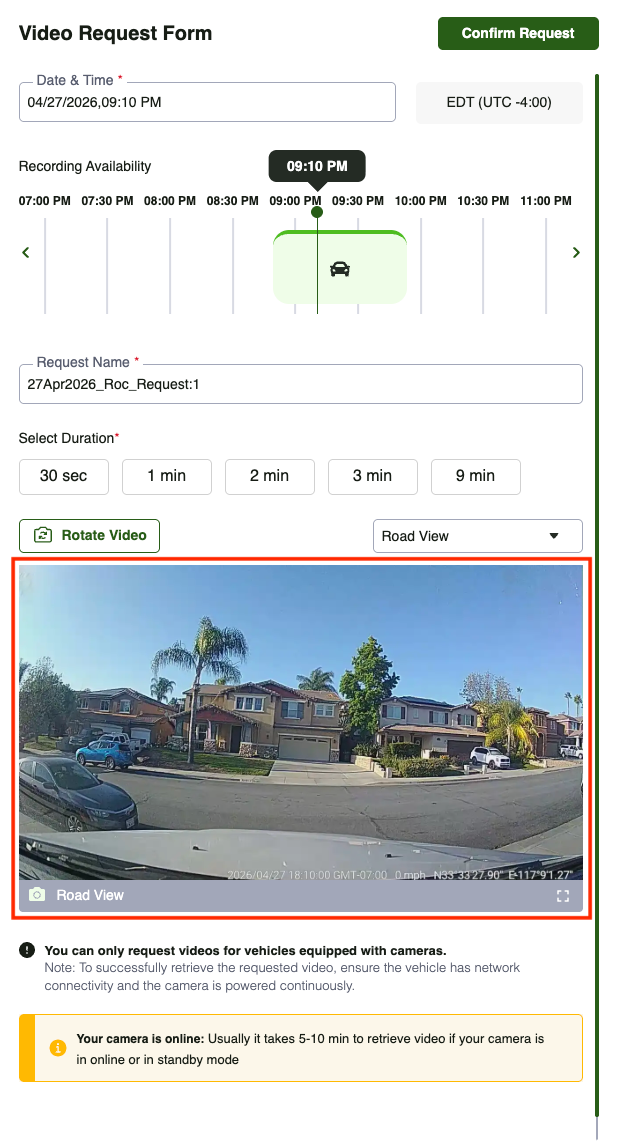
1. New Feature - Snapshot View for Request Videos
We’re introducing Snapshot View for Request Videos, a highly requested enhancement designed to make video retrieval faster and more intuitive.
- View recording availability on a timeline for cameras that are online or in standby, based on network connectivity.
- Quickly browse recordings using visual snapshots to understand what’s happening at any moment before placing a request.
- Request videos with greater precision, without needing to review entire footage.
- Seamlessly switch between Driver, Road, and Aux camera views to get complete context and improve video request accuracy. Each view can also be rotated for optimal viewing.
- Minimize back-and-forth, saving time and enabling quicker access to critical footage when it matters most.
Navigation:
- From the SafetyCam main page, navigate to Request Video(s).
- In the Select Vehicle panel, search or scroll to choose a camera that is online or in standby mode.
For more details on the Snapshot View for Request Videos, please refer to the document below: [Customer] The New Video Telematics Experience.pdf
Note:
|
2. Auto-Retry Mechanism for Video Requests
- Automatically retries video requests to significantly improve retrieval success rates
- Ensures more reliable and consistent access to requested footage
- Reduces failed requests caused by timeline and footage mismatches
Note:
|
AI Accuracy Improvements:
We’ve enhanced our AI models to deliver more accurate detections and reduce false alerts across key safety events.
- Fatigue Detection: Improved eye detection to reduce false alerts caused by sunglasses or prescription glasses
- Rolling Stop: Added an additional validation layer to minimize false rolling stop events
- Seatbelt Detection: Enhanced detection accuracy across varied driving conditions
- Lane Departure: Improved detection accuracy, reducing false positives caused by streetlight reflections on the windshield.
- Obstruction Detection:
- Improved detection accuracy with added driver face and body validation
- Faster detection, reducing obstruction event identification time by up to one-third
- Phone Usage: Improved detection precision to reduce missed events
- Distraction Detection: More accurately captures events where the driver looks down for extended periods.
Auto Calibration Improvements:
- Enhanced camera height estimation now runs continuously in the background, enabling more dynamic and accurate calibration
- Improved face detection accuracy with an updated driver monitoring object detection model.
Live Stream Improvements:
- Enhanced live streaming performance for a smoother, lower-latency experience
- Enables faster and more reliable access to real-time vehicle footage when it matters most
SafetyCam Health Report:
Enhanced SD card health reporting for Next-Gen SafetyCam devices, providing clearer visibility into device status and overall health.
Additional Information:
1. Firmware Update Details:
- Updated Firmware Version – 20260407_1111-1.5
- Update Mode - Firmware updates will happen automatically once the SafetyCam devices establish connection.
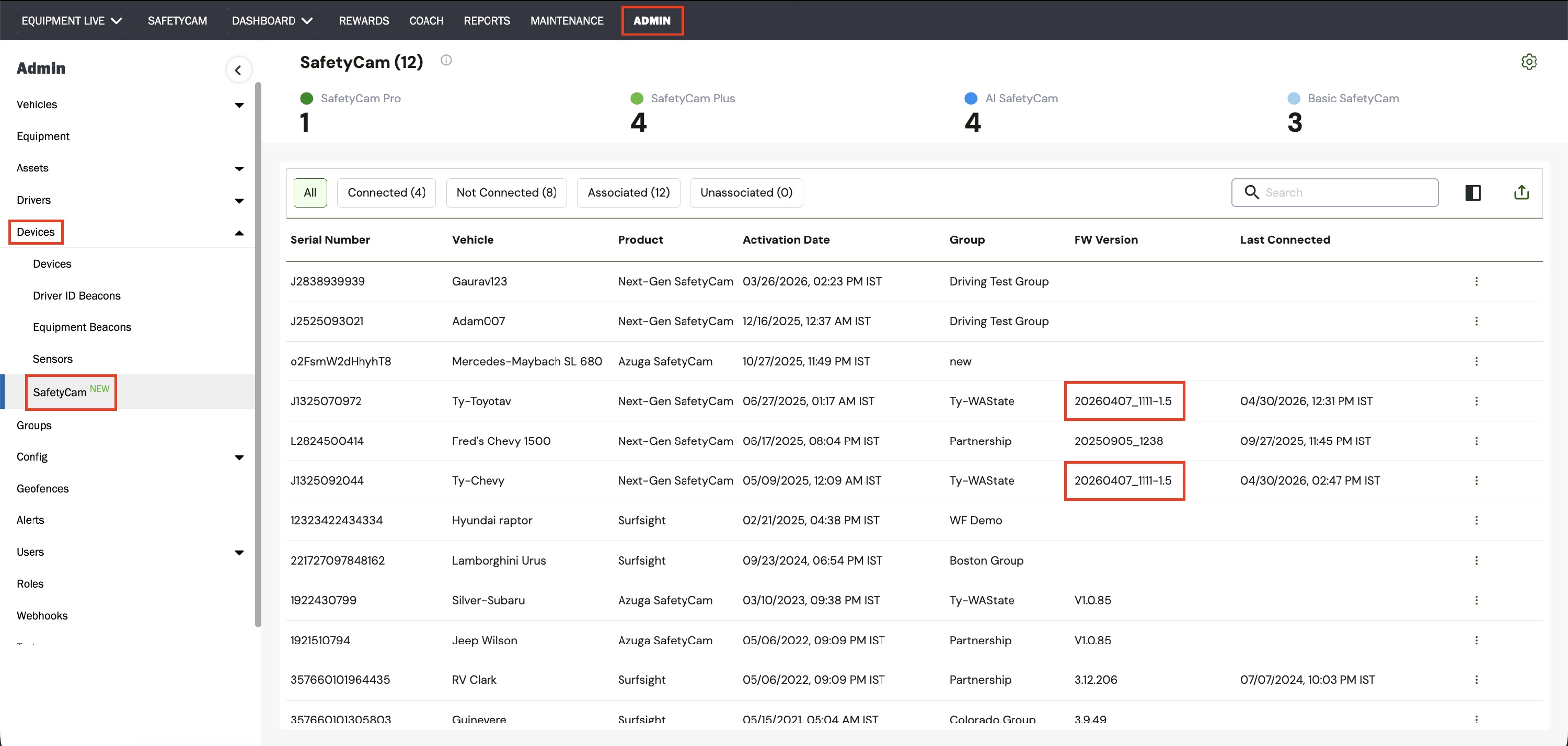
2. How to Check the Latest Firmware Version:
- Log in Azuga Fleet Web portal with your credentials.
- Go to Admin module.
- Navigate to Devices > SafetyCam New section.
- Check the FW Version column in the table.
The firmware version for the Next-Gen SafetyCams devices should be 20260407_1111-1.5.
PDF copy of the Release Notes: Firmware Updates for Next-Gen Cameras - April 2026
Was this article helpful?
That’s Great!
Thank you for your feedback
Sorry! We couldn't be helpful
Thank you for your feedback
Feedback sent
We appreciate your effort and will try to fix the article