Improvements:
- The Azuga ELD mobile app now supports vehicle QR code scanning in the Switch Equipment popup, making it easier for drivers to identify and select the correct vehicle. With the new Scan button next to the Vehicle Name field, drivers can scan a vehicle pairing QR code and automatically retrieve the associated vehicle information instead of manually entering the vehicle name.
- The Azuga ELD Android app now allows drivers to create and manage their own Personal Resources. This enhancement provides drivers with a dedicated space to store and access their personal resource files directly from the mobile app.
Deep Dive
Vehicle QR Code Scanning for Switch Equipment
The Azuga ELD mobile app now supports vehicle QR code scanning in the Switch Equipment popup, making it easier for drivers to identify and select the correct vehicle. With the new Scan button next to the Vehicle Name field, drivers can scan a vehicle pairing QR code and automatically retrieve the associated vehicle information instead of manually entering the vehicle name.
This enhancement simplifies the equipment switching process, reduces manual entry errors, and provides a more convenient experience for drivers.
What’s New:
Drivers can now scan vehicle pairing QR codes directly from the Switch Equipment popup in the Azuga ELD mobile app. The new Scan button next to the Vehicle Name field allows drivers to quickly identify and select a vehicle without manually entering its name.
- Quick Vehicle Identification: Scan a vehicle QR code to automatically retrieve the associated vehicle information.
- Multiple Vehicle Selection: Choose the correct vehicle from a list when multiple vehicles share the same VIN.
- Vehicle Validation: Receive clear error messages for invalid VINs, unavailable vehicles, or QR codes associated only with trailers.
- Improved Scanning Experience: Use the full-screen scanner with torch controls, progress indicators, and an option to retry scanning.
- Account Specific Results: View only matching vehicles available to the driver's account.
- Multilingual Support: Access the scanning interface and messages in English, Spanish, and French.
How It Works
- Open the Switch Equipment popup in the Azuga ELD mobile app.
- Tap Scan next to the Vehicle Name field.
- Grant camera permission if prompted.
- Position the vehicle pairing QR code within the scanning frame.
- Once a valid QR code is recognized, the app retrieves the associated vehicle information.
- Review the vehicle name and tap OK to populate the Vehicle Name field in the Switch Equipment popup.
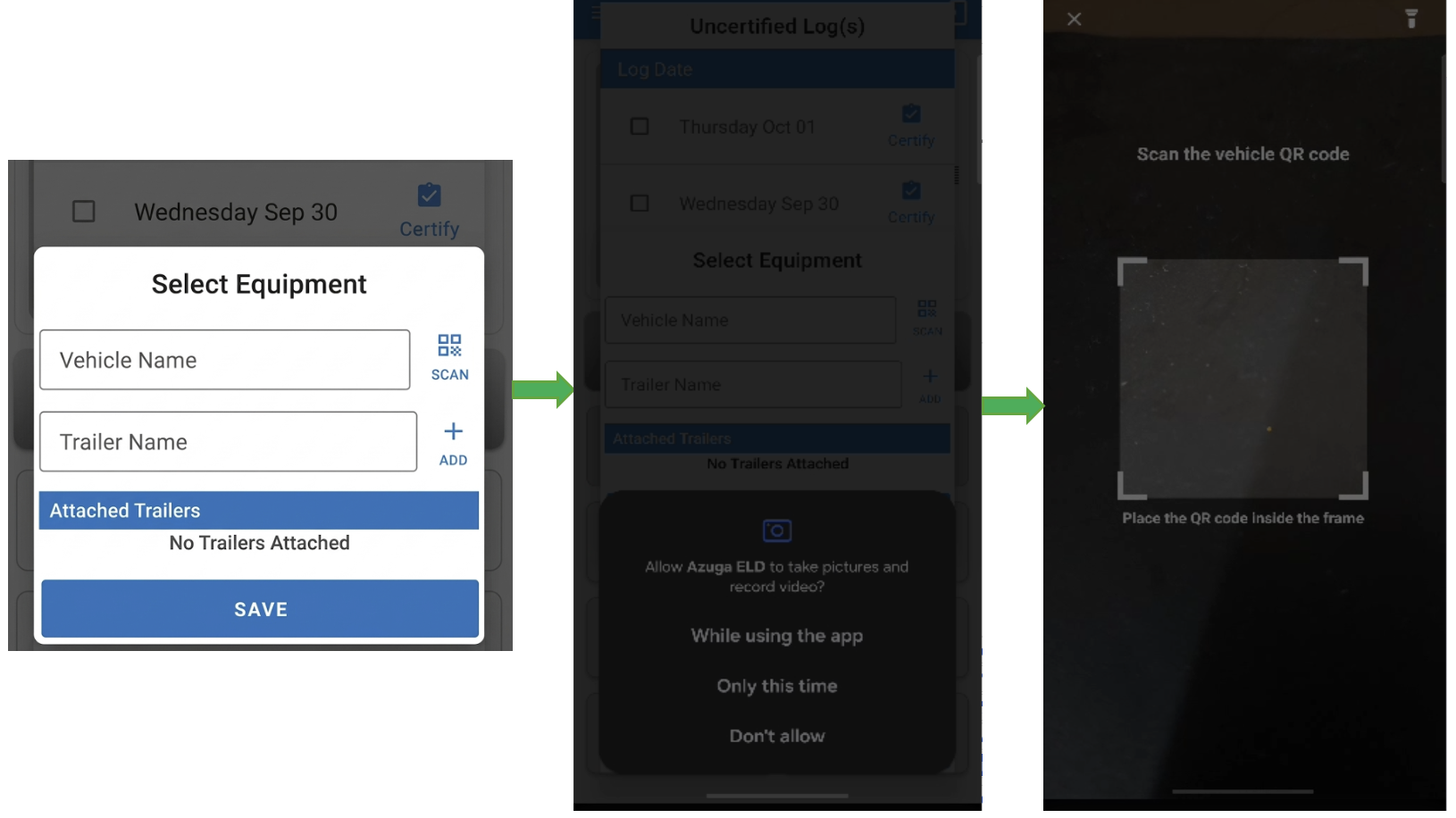
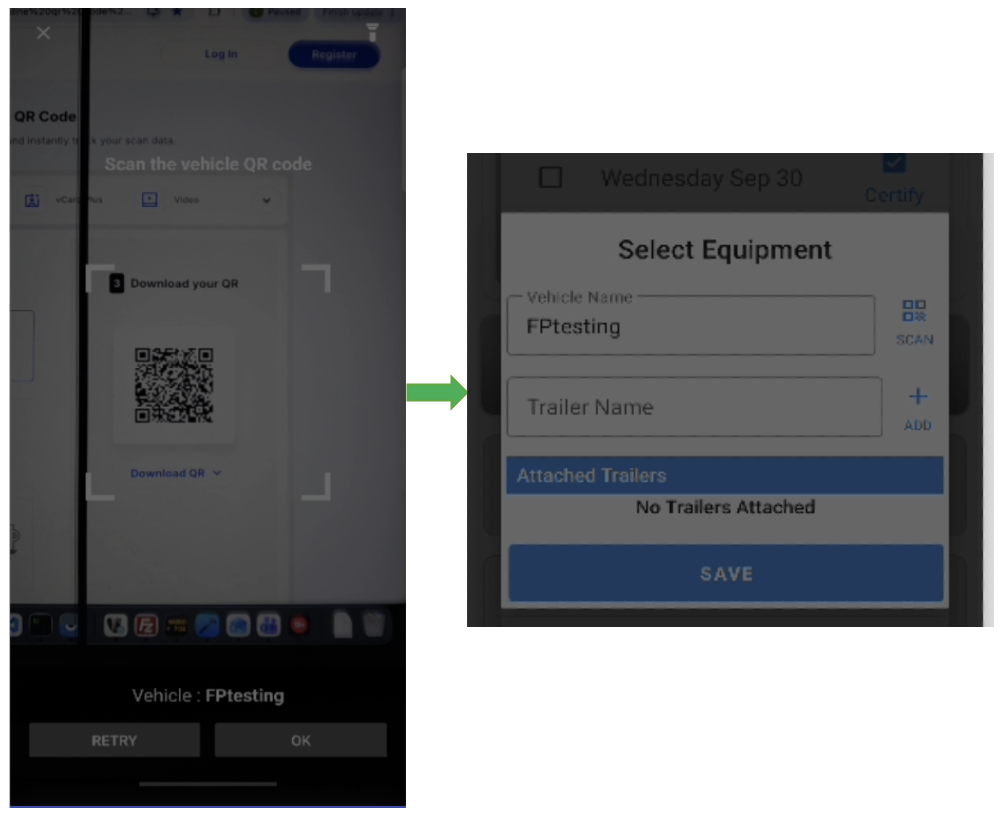
The scanner includes a torch control for improved visibility in low light conditions and a close button to exit the scanning screen. A progress indicator appears while the app retrieves vehicle information.
Key Benefits:
- Faster vehicle selection: Scan a vehicle pairing QR code to retrieve vehicle information quickly.
- Improved accuracy: Reduce errors associated with manually entering vehicle names.
- Multiple vehicle matching: Select the appropriate vehicle when multiple vehicles share the same VIN.
- Clear scan feedback: View vehicle details, receive error messages, and retry scans when necessary.
- Multilingual support: Access the scanning experience in English, Spanish, and French.
Personal Resources for Drivers
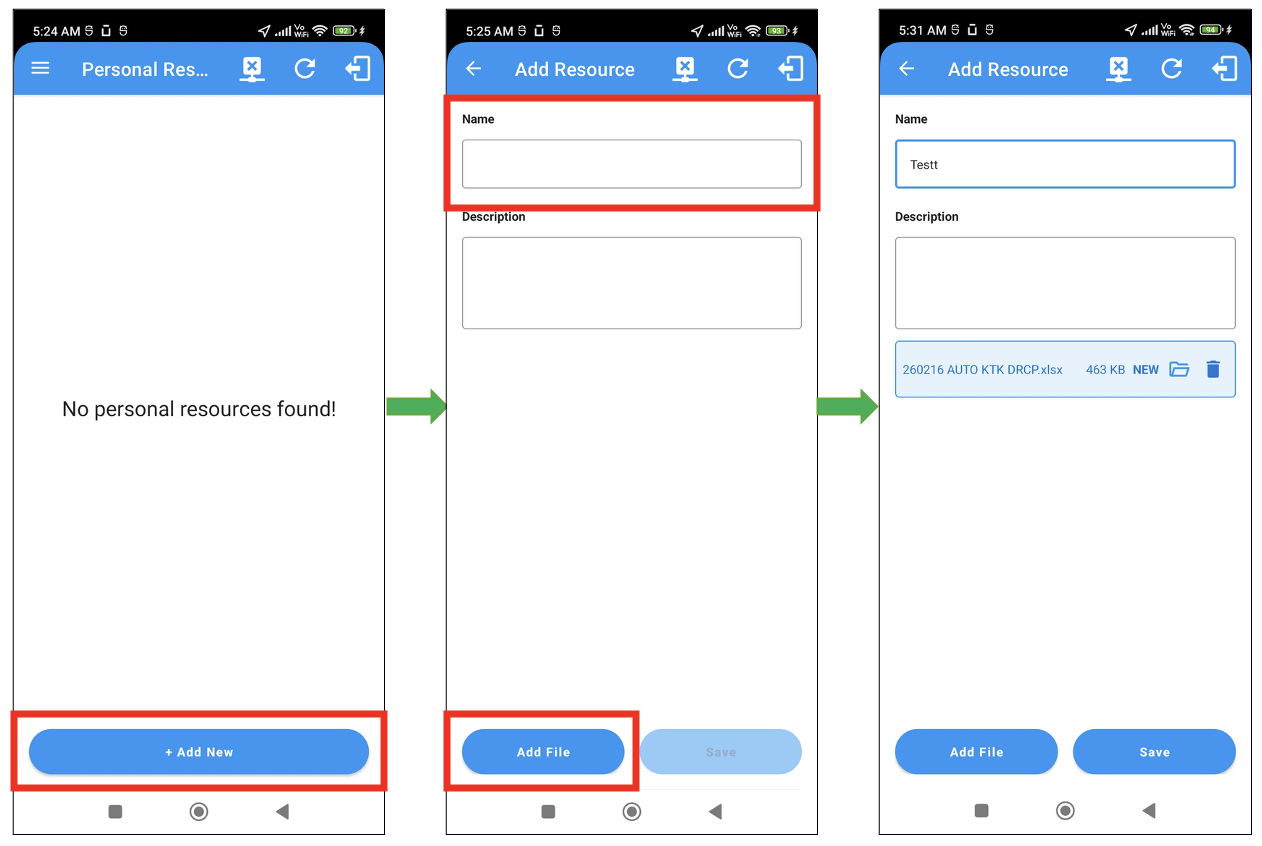
The Azuga ELD Android app now allows drivers to create and manage their own Personal Resources. This enhancement provides drivers with a dedicated space to store and access their personal resource files directly from the mobile app.
Drivers can add resources using a supported resource name format, making it easier to organize and maintain their personal files. Access is restricted to the driver who created the resources and their associated administrator, helping ensure that personal resources remain accessible only to authorized users.
Key Features
- Add Personal Resources: Drivers can create and add personal resources directly from the Android app.
- Driver Specific Access: Each driver can access their own personal resources.
- Administrator Visibility: The driver's associated administrator can also view the resources added by that driver.
- Restricted Access: Personal resources are not visible to other drivers, maintaining separation between individual drivers' resources.
- Resource Name Validation: Resource names support letters, numbers, spaces, and the following special characters: @ # $ * & % \ _ - .
Benefits:
This enhancement gives drivers greater control over their personal resources while providing administrators with the visibility needed to access driver specific information. By keeping resources organized and access appropriately restricted, the feature improves resource management within the Azuga ELD Android app.
For bug fix refer to the attachment.
Was this article helpful?
That’s Great!
Thank you for your feedback
Sorry! We couldn't be helpful
Thank you for your feedback
Feedback sent
We appreciate your effort and will try to fix the article