Improvements:
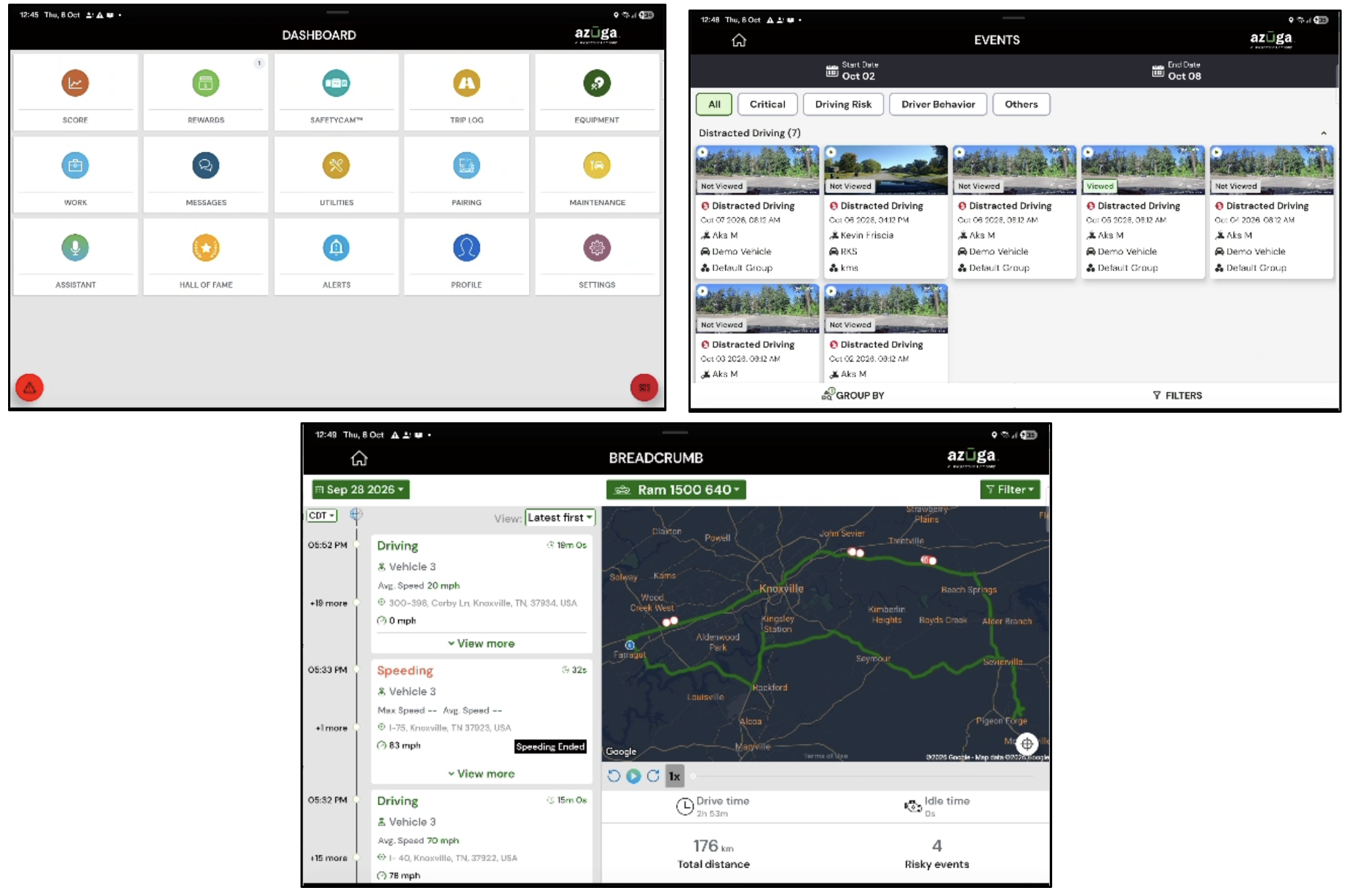
- The Azuga Fleet Mobile app now provides an improved landscape experience on tablets and larger devices, with adaptive layouts across key Driver and Admin workflows. Users can rotate their devices seamlessly while retaining their current screen, data, and in-progress work where supported.
- The Azuga Fleet Mobile app has been upgraded to Android SDK 36, bringing the app in line with the latest Android platform requirements and improving compatibility across supported devices.
- An additional layer of security has been introduced for the Rewards feature in the Azuga Fleet Mobile app. When Admins load funds into their rewards balance or issue rewards to Drivers, they receive a one-time password (OTP) via email.
Deep Dive
Landscape Support for Tablets and Large-Screen Devices
The Azuga Fleet Mobile app now provides an improved landscape experience on tablets and larger devices, with adaptive layouts across key Driver and Admin workflows. Users can rotate their devices seamlessly while retaining their current screen, data, and in-progress work where supported.
This reduces unnecessary reloads and helping users resume where they left off.
What’s New:
The Azuga Fleet Mobile app now supports landscape orientation across key Driver and Admin workflows on tablets and devices with a screen width of 600 dp or greater. The interface adapts to the available screen space, with responsive layouts, adaptive tiles, and multi-column or split-screen views where supported. The app also retains screen state and in-progress activities across orientation changes in supported workflows.
User Impact:
The Drivers and Admins can use the app more comfortably on larger screens in both portrait and landscape orientations. Adaptive layouts improve readability and make better use of the available screen space, while state retention helps minimize workflow interruptions when devices are rotated. This provides a smoother experience when navigating key features, viewing information, and completing tasks.
|
Android SDK 36 Upgrade
The Azuga Fleet Mobile app has been upgraded to Android SDK 36, bringing the app in line with the latest Android platform requirements and improving compatibility across supported devices.
What’s New:
The Azuga Fleet Mobile app has been upgraded to target Android SDK 36, aligning the application with the latest Android platform requirements and associated behavior changes for large-screen devices. This upgrade also addresses Android's handling of orientation restrictions on larger screens, supporting the landscape improvements introduced in this release.
User Impact
This upgrade helps keep the app aligned with evolving Android platform requirements and improves its readiness for newer Android behaviors. Users benefit from an app experience that better accommodates large-screen devices and the platform's updated orientation handling.
|
OTP Verification for Rewards Transactions
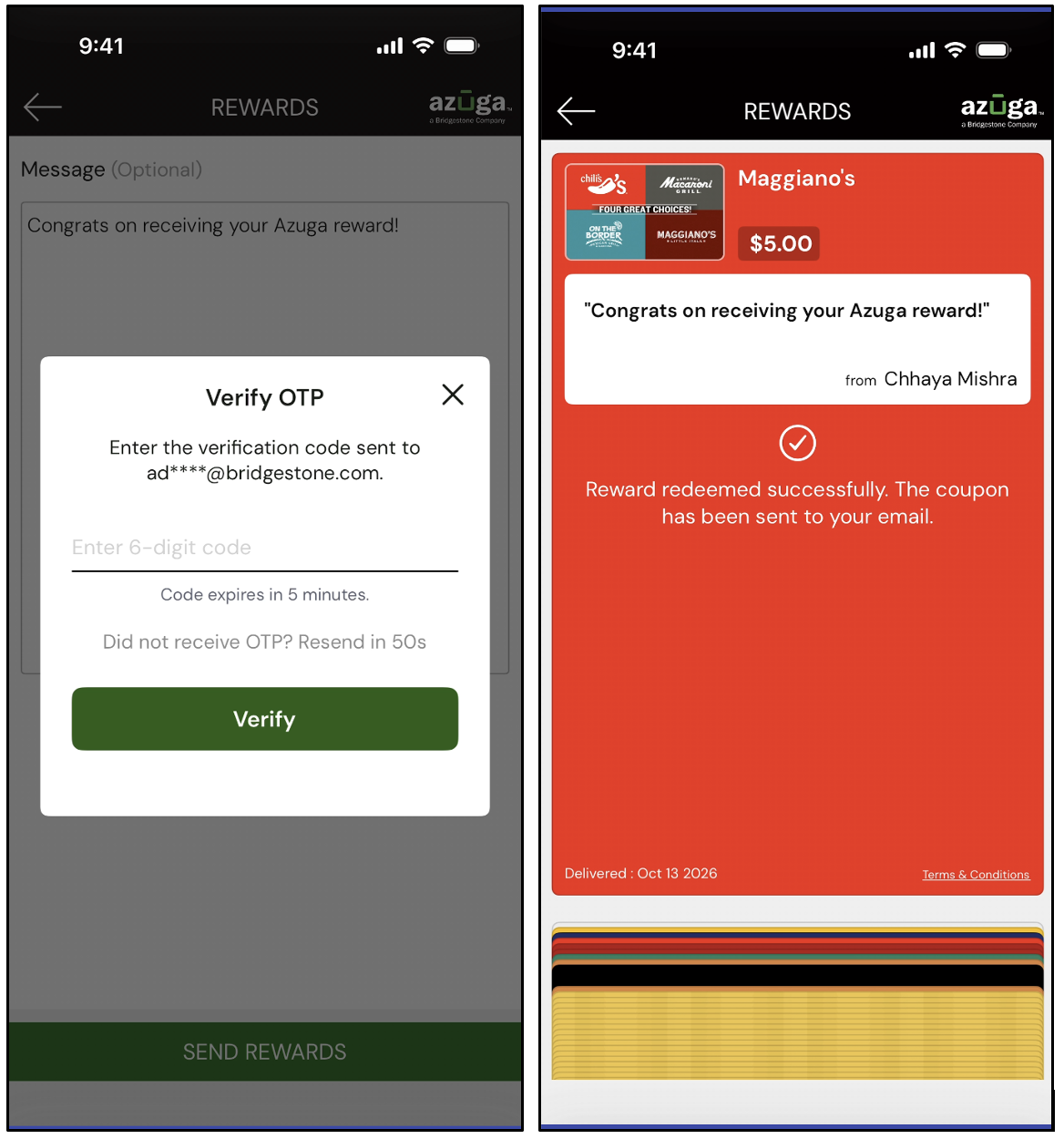
An additional layer of security has been introduced for the Rewards feature in the Azuga Fleet Mobile app. When Admins load funds into their rewards balance or issue rewards to Drivers, they receive a one-time password (OTP) via email.
What’s New:
An additional layer of security has been introduced for the Rewards feature in the Azuga Fleet Mobile app. When Admins load funds into their rewards balance or issue rewards to Drivers, they receive a one-time password (OTP) via the registered email address. Admins must enter the OTP to verify and confirm the transaction before it can proceed.
User Impact:
OTP verification helps ensure that balance top-ups and driver reward transactions are authenticated before completion. This added verification step strengthens transaction security and gives Admins greater confidence when managing reward balances and issuing driver incentives.
Note: This feature is available for both Android and iOS |
Was this article helpful?
That’s Great!
Thank you for your feedback
Sorry! We couldn't be helpful
Thank you for your feedback
Feedback sent
We appreciate your effort and will try to fix the article