Overview
Improvements:
The French (Canada) experience in the Azuga Fleet Mobile app has received a major upgrade, with significantly improved translations that are more accurate, natural, and contextually aligned with Canadian French. This enhancement delivers a more polished, authentic, and seamless localized experience for Canadian users.
The password change experience has been enhanced with improved backend validation and UI feedback. The application now correctly validates the current password before allowing a password update and provides real time guidance to help users create passwords that meet the required security criteria, resulting in a more secure and intuitive experience.
Improved Address Search in TrackME . The TrackME Place Picker now supports address searches even when an address is entered manually without selecting a suggestion from the search dropdown. Using reverse geocoding, the application automatically resolves the entered address into a valid location, making address searches more flexible and user friendly.
Custom Date Range for Alerts, the Alerts tile in the AFM app now supports custom date range selection. Previously, alerts were limited to the last seven days. Users can now select a custom date range to review historical alerts more effectively.
Deep Dive
French (Canada) Language Support
The French (Canada) experience in the Azuga Fleet Mobile app has received a major upgrade, with significantly improved translations that are more accurate, natural, and contextually aligned with Canadian French. This enhancement delivers a more polished, authentic, and seamless localized experience for Canadian users.
As part of this release, we've refined the French (Canada) translations across the Android application based on customer feedback and reviews from language experts.
What’s New:
Several French (Canada) text strings have been updated to better reflect native language usage and improve contextual accuracy. Rather than relying on literal translations, the updated strings have been carefully reviewed to align with commonly used Canadian French terminology and phrasing, resulting in a more polished and user-friendly experience.
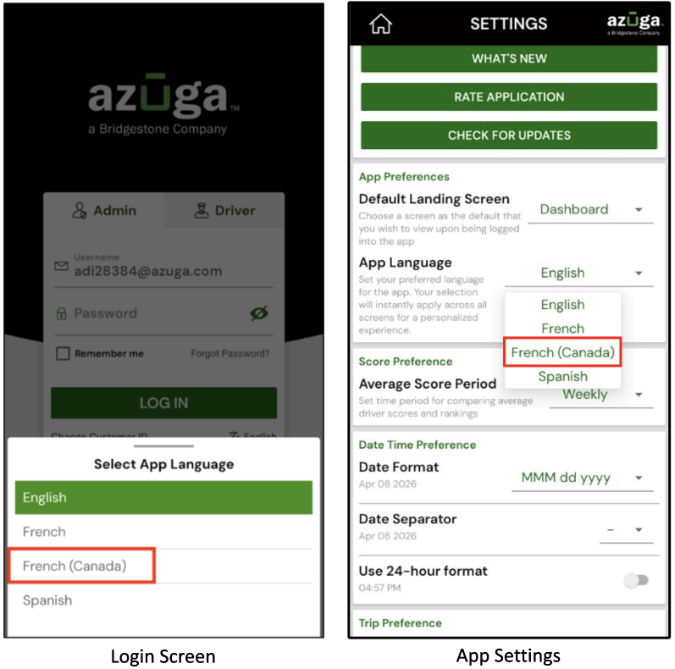
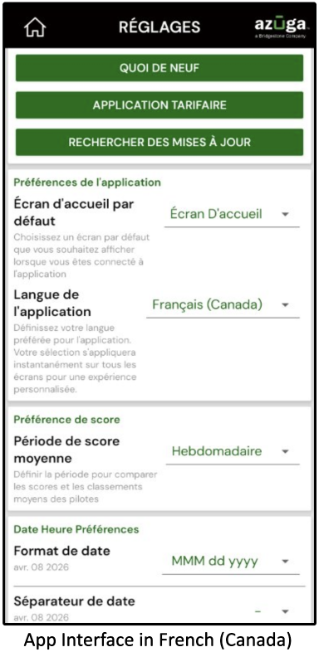
Note: This improvement has been implemented on both Android and iOS.
Enhanced Password Validation
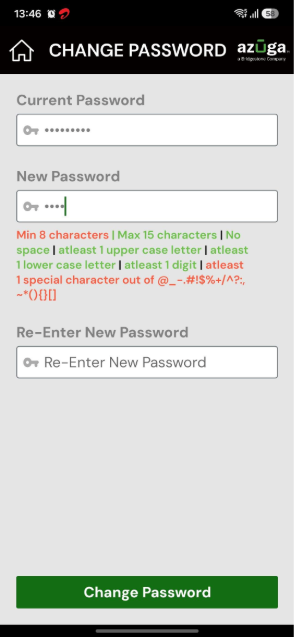
The password change experience has been enhanced with improved backend validation and UI feedback. The application now correctly validates the current password before allowing a password update and provides real-time guidance to help users create passwords that meet the required security criteria, resulting in a more secure and intuitive experience.
This release addresses a backend validation issue while introducing additional UI improvements to help users create compliant passwords more easily.
What’s New:
The application now correctly validates the current password before allowing users to change their password, ensuring that only authorized password updates are accepted.
In addition, the password change screen now provides real-time UI guidance by displaying password requirements and validation feedback as users enter their new password, helping them meet the required password criteria before submission.
User Impact:
This enhancement improves account security by preventing unauthorized or accidental password changes and ensures that password updates are completed only after successful validation of the current password.
Note: This improvement has been implemented on both Android and iOS.
Improved Address Search in TrackMe
Improved Address Search in TrackME. The TrackME Place Picker now supports address searches even when an address is entered manually without selecting a suggestion from the search dropdown. Using reverse geocoding, the application automatically resolves the entered address into a valid location, making address searches more flexible and user friendly.
The TrackME address search experience has been enhanced to provide a more intuitive and flexible way to search for locations.
What’s New:
The TrackME Place Picker now supports manual address searches without requiring users to select a location from the suggested dropdown.
Using reverse geocoding, the application automatically resolves the entered address into a valid location.
User Impact:
Users can search for destinations more efficiently, even when they don't select a suggested address, making the TrackME feature faster and easier to use.
Note: This feature is available for both Android and iOS
Custom Date Range for Alerts
The Alerts tile in the AFM app now supports custom date range selection. Previously, alerts were limited to the last seven days. Users can now select a custom date range to review historical alerts more effectively.
The Alerts feature has been enhanced to provide greater flexibility when reviewing historical alert data. .
What’s New:
Users can now apply a custom date range when viewing alerts in the AFM app. Previously, alerts were limited to the last seven days
This enhancement allows users to retrieve alerts for a user-defined time period
User Impact:
Users can analyse alerts over specific timeframes, making it easier to investigate events, review trends, and generate more meaningful operational insights.
Bug Fixes:
This release also includes the following fixes:
Fixed an issue where the Driver option was incorrectly displayed in the Group By menu during Driver Login.
Fixed an issue where selecting the currently selected option caused the selection list to close unexpectedly.
Fixed an issue where the Maximize and Minimize buttons did not function as expected.
Fixed an issue where the AFM application did not automatically pair with a vehicle in certain scenarios.
General stability improvements and minor bug fixes.
PDF Copy of the Release notes: AFM Release Notes - July 2026 Updates
Was this article helpful?
That’s Great!
Thank you for your feedback
Sorry! We couldn't be helpful
Thank you for your feedback
Feedback sent
We appreciate your effort and will try to fix the article