Improvements
- To support regulatory requirements and improve configuration flexibility, the iOS Azuga Driver application now supports platform specific ELD identifiers for both FMCSA and CCMTA operating zones.
- We've enhanced the Driver Vehicle Inspection Report (DVIR) experience on iOS to make both Pre-Trip and Post-Trip inspections clearer, more consistent, and easier to complete.
Deep Dive
Platform Specific ELD Identifier for FMCSA and CCMTA
To support regulatory requirements and improve configuration flexibility, the iOS Azuga Driver application now supports platform specific ELD identifiers for both FMCSA and CCMTA operating zones.
Previously, ELD identifiers could be shared across Android and iOS devices. With this enhancement, administrators can configure dedicated ELD identifiers specifically for iOS, ensuring the correct identifier is used based on the driver's operating jurisdiction.
What's New
Dedicated ELD Identifiers for iOS:
The following account properties are now available for configuring ELD identifiers on iOS:
Account Property | Description |
hos.eld.identifier.fmcsa.ios | ELD identifier used by iOS devices operating under FMCSA regulations. |
hos.eld.identifier.ccmta.ios | ELD identifier used by iOS devices operating under CCMTA regulations. |
The iOS application automatically selects the appropriate identifier based on the driver's configured operating zone.
How It Works
When an iOS driver logs into the Azuga Driver app, the application determines the driver's operating zone and uses the corresponding ELD identifier configured for iOS:
- Drivers operating under FMCSA use the value configured in hos.eld.identifier.fmcsa.ios.
- Drivers operating under CCMTA use the value configured in hos.eld.identifier.ccmta.ios.
This allows separate ELD identifiers to be maintained for each regulatory framework without affecting other platforms.
Benefits
- Supports dedicated ELD identifiers for FMCSA and CCMTA on iOS.
- Improves flexibility when managing ELD configurations for different regulatory jurisdictions.
- Helps ensure the correct ELD identifier is used for iOS drivers based on their operating zone.
- Simplifies compliance with region-specific ELD requirements.
Improved DVIR Experience with Clearer Vehicle Information and Streamlined Notifications
We've enhanced the Driver Vehicle Inspection Report (DVIR) experience on iOS to make both Pre-Trip and Post-Trip inspections clearer, more consistent, and easier to complete.
With this update, DVIR popups now display the assigned vehicle name and trailer name(s), when applicable, helping drivers immediately identify the equipment requiring inspection. We've also streamlined notifications by removing the redundant pre-trip toast notification. In addition, the Post-Trip DVIR workflow now prompts co-drivers independently during logout, ensuring each driver has an opportunity to complete their inspection.
What’s Improved
Clearer Vehicle and Trailer Information:
The Pre-Trip and Post-Trip DVIR popups now display:
- Vehicle name
- Trailer name(s), when one or more trailers are assigned
Previously, the popups displayed only a generic reminder to perform an inspection. Drivers can now verify the equipment directly from the popup without needing to determine the assigned assets separately.
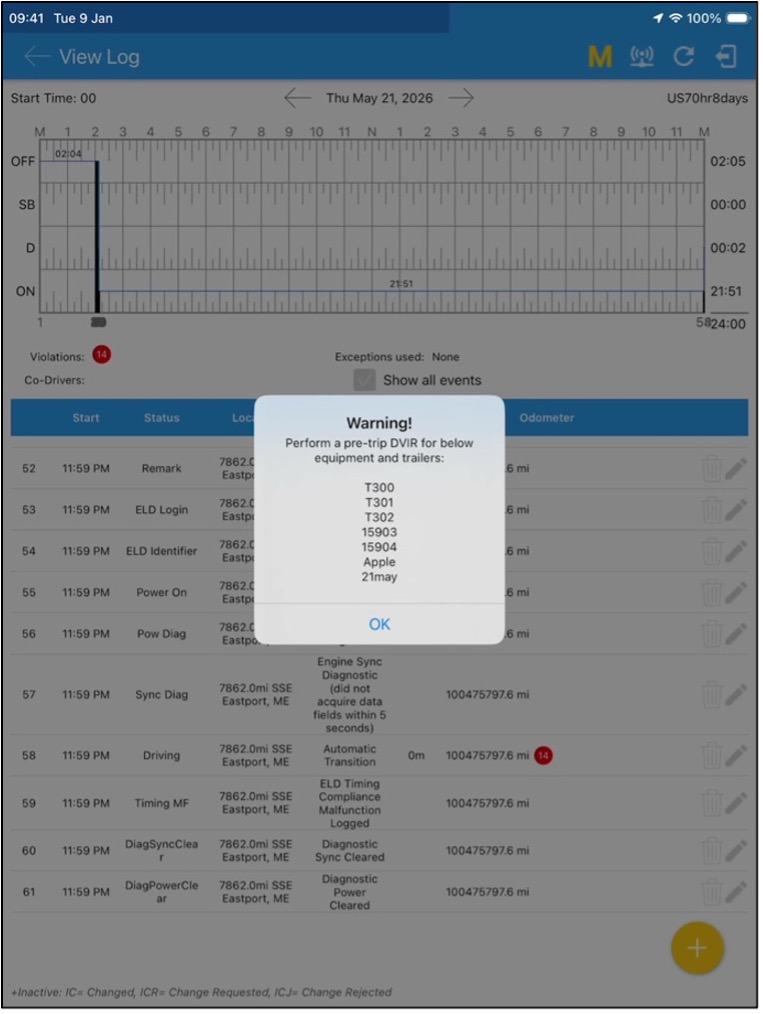
Streamlined Pre-Trip DVIR Notifications:
The redundant toast notification that previously appeared when opening the Pre-Trip DVIR has been removed. Since the popup now provides the necessary inspection information, eliminating the additional toast reduces visual clutter and provides a cleaner experience without changing the existing inspection workflow.
Post-Trip DVIR Support for Co-Drivers:
The Post-Trip DVIR workflow has been extended to support co-drivers. Previously, only the primary driver received the Post-Trip DVIR popup during logout. Now, both the primary driver and co-driver receive the popup independently when logging out, provided the existing Post-Trip DVIR conditions are met.
This ensures each driver has the opportunity to complete their own post-trip inspection, with separate alerts and remarks generated for each driver as applicable.
Benefits
- Provides clearer visibility into the vehicle and trailer being inspected
- Reduces duplicate and unnecessary notifications
- Makes the DVIR workflow cleaner and more intuitive
- Ensures both primary drivers and co-drivers are independently prompted for Post-Trip DVIR
- Improves inspection tracking and auditability through driver specific alerts and remarks
- Maintains the existing DVIR workflow while providing a more consistent inspection experience
For bug fixes, refer to the pdf document: [Customer] ELD IOS Release Notes - September 2026.pdf
Was this article helpful?
That’s Great!
Thank you for your feedback
Sorry! We couldn't be helpful
Thank you for your feedback
Feedback sent
We appreciate your effort and will try to fix the article