Improvements:
- We've enhanced the Android ELD app to support platform specific ELD identifiers for fleets operating under both FMCSA and CCMTA regulations.
- We've enhanced the Android ELD app to improve how Hours of Service (HOS) calculations are recalculated when drivers edit historical logs that span multiple operating cycles.
- To provide better context during vehicle inspections, the Android ELD app now displays the vehicle name and, when applicable, the trailer name in both Pre-Trip and Post-Trip DVIR confirmation popups.
- To ensure the Android ELD app continues to deliver a reliable and modern experience, we've updated the application to support Android 16 (API Level 36). This enhancement aligns the app with the latest Android platform requirements while improving compatibility across a wide range of Android devices
Deep Dive
Platform Specific ELD Identifier Support for FMCSA and CCMTA
We've enhanced the Android ELD app to support platform specific ELD identifiers for fleets operating under both FMCSA and CCMTA regulations.
Previously, a single ELD identifier was used across operating jurisdictions. With this enhancement, organizations can now configure dedicated identifiers for Android devices based on the driver's operating zone. The app automatically retrieves and uses the appropriate identifier, helping ensure data transfers are aligned with the applicable regulatory requirements.
What's Changed:
The Android ELD app now automatically selects the appropriate ELD identifier based on the driver's current operating jurisdiction:
- FMCSA – Uses the configured FMCSA Android identifier.
- CCMTA – Uses the configured CCMTA Android identifier.
This enhancement allows fleets that operate in both the U.S. and Canada to manage ELD identifiers independently, reducing the risk of using an incorrect identifier during compliance-related activities.
Benefits:
- Improved regulatory compliance by using the correct ELD identifier for the applicable operating jurisdiction.
- Simplified administration for fleets managing both FMCSA and CCMTA operations.
- More reliable electronic data transfers by ensuring the correct identifier is included based on the driver's operating zone.
- Seamless driver experience when transitioning between U.S. and Canadian operations, as the app continues to use the appropriate identifier without requiring manual intervention.
- Backward compatibility with existing driver records, ensuring historical information is retained when switching operating jurisdictions.
Impact:
No action is required unless your organization uses different ELD identifiers for FMCSA and CCMTA operations. If separate identifiers are configured for Android devices, the app will automatically use the correct identifier based on the driver's current operating jurisdiction.
If no platform specific identifiers have been configured, the app will continue to operate using your existing identifier configuration, ensuring a seamless transition to this enhancement.
Improved Hours of Service Recalculation After Log Edits
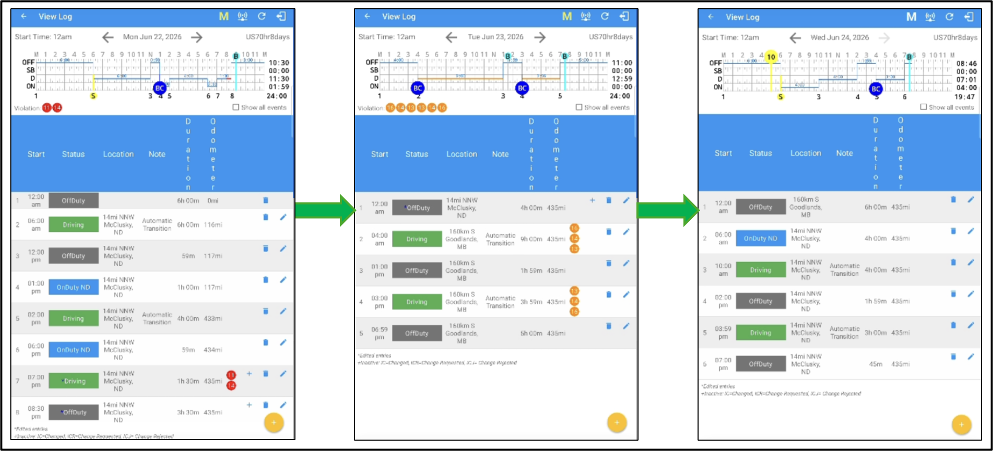
We've enhanced the Android ELD app to improve how Hours of Service (HOS) calculations are recalculated when drivers edit historical logs that span multiple operating cycles.
Previously, edits made to historical duty status records could impact HOS calculations across different operating cycles, potentially leading to inaccurate compliance results in certain scenarios. With this enhancement, the app now recalculates HOS using each operating cycle independently, providing more accurate results after log edits.
What's Changed:
When a driver edits a historical duty status event, the Android ELD app now recalculates Hours of Service separately for each operating cycle instead of recalculating across the entire timeline. This ensures that HOS calculations remain aligned with the regulations that were in effect during each operating cycle.
The enhancement is especially beneficial for fleets that:
- Switch between FMCSA and CCMTA operating cycles.
- Perform edits to historical duty status records after the original logs have been created.
- Manage drivers who operate across multiple jurisdictions.
Benefits
- More accurate HOS calculations following edits to historical duty status records.
- Improved compliance by applying the correct Hours of Service rules within each operating cycle.
- More reliable violation detection, ensuring violations are evaluated using the appropriate regulatory cycle after edits are made.
- Consistent behavior when drivers transition between FMCSA and CCMTA operating cycles.
- Greater confidence that compliance calculations reflect the driver's actual operating history, even after log corrections.
Vehicle and Trailer Names Added to Pre-Trip and Post-Trip DVIR Reminders
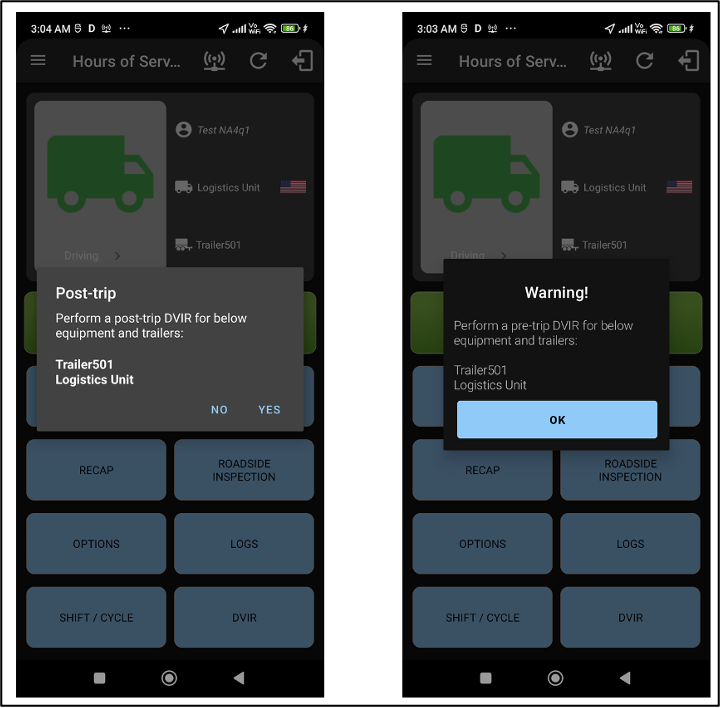
To provide better context during vehicle inspections, the Android ELD app now displays the vehicle name and, when applicable, the trailer name in both Pre-Trip and Post-Trip DVIR confirmation popups.
Previously, drivers received DVIR reminders without clearly identifying which vehicle or trailer the inspection applied to. This could lead to confusion, particularly for drivers who operate multiple vehicles or switch between trailers during their shift.
With this enhancement, both the Pre-Trip and Post-Trip DVIR confirmation popups clearly identify the associated vehicle and trailer, making it easier for drivers to confirm which assets require inspection before completing or dismissing the reminder.
Why this matters
- Clearly identifies the vehicle and trailer associated with each DVIR reminder.
- Reduces confusion for drivers operating multiple vehicles or trailers.
- Helps ensure inspections are completed for the correct assets.
- Creates a more intuitive and efficient DVIR workflow by providing the necessary asset information directly within the confirmation popup.
Enhanced Compatibility with Android 16
To ensure the Android ELD app continues to deliver a reliable and modern experience, we've updated the application to support Android 16 (API Level 36). This enhancement aligns the app with the latest Android platform requirements while improving compatibility across a wide range of Android devices
As part of this update, we've refined how the app interacts with the latest Android system features, resulting in a more consistent and intuitive user experience on both phones and larger screen devices.
What's New
The Android ELD app now provides better compatibility with Android 16 by improving several core platform behaviors, including:
- Enhanced support for the latest Android system navigation and gesture controls.
- Improved display handling to ensure app content is presented correctly around system bars, display cutouts, and device notches.
- A more consistent experience when navigating through confirmation dialogs and critical workflows.
- Better compatibility with tablets and foldable devices, providing a more reliable experience across different screen sizes and orientations.
- Continued support for landscape and portrait workflows where required, including key driver interactions such as signature capture and authentication.
Benefits
This platform update provides several improvements for drivers:
- Improved compatibility with Android 16, ensuring the app continues to function as expected on the latest Android devices.
- A more immersive viewing experience, with screens that adapt correctly to modern edge-to-edge Android displays.
- More intuitive navigation, aligning app behavior with the latest Android system gestures and navigation patterns.
- Better support for large screen devices, including tablets and foldables, with improved screen layout and orientation handling.
- A more consistent user experience across core workflows such as login, Hours of Service, DVIR, equipment management, roadside inspections, and settings.
For bug fixes, refer to the PDF Copy: [Customer] ELD Android Release Notes - August 2026.pdf
Was this article helpful?
That’s Great!
Thank you for your feedback
Sorry! We couldn't be helpful
Thank you for your feedback
Feedback sent
We appreciate your effort and will try to fix the article