You can configure alerts on their own.
There are two alert types:
✅ Instant Alert: Triggered immediately when a vehicle exceeds the defined speed threshold.
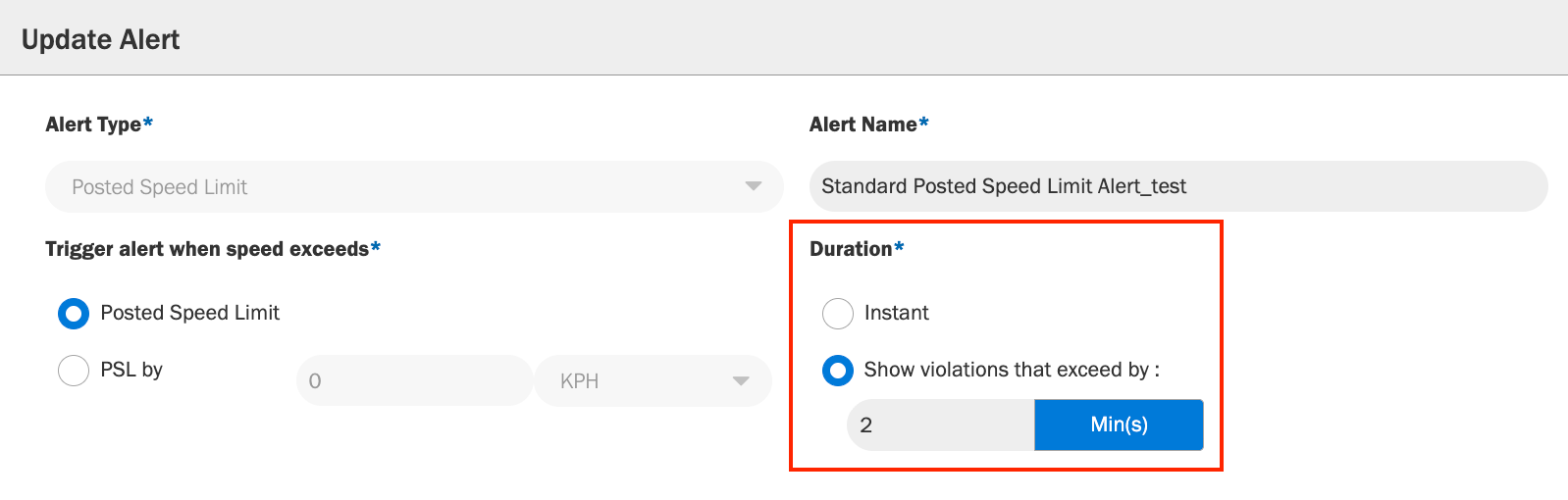
✅ Duration-Based Alert (Recommended): Triggers only when the vehicle exceeds the defined speed threshold for a set duration (for example, 10 mph over the posted speed limit for 60 seconds).
We strongly recommend using duration-based alerts, as they provide more consistent and accurate detection of speed violations and help reduce false positives caused by brief speed fluctuations.
To set up a PSL alert:
- Go to Admin > Alerts.
- Select Add Alert or edit an existing alert.
- Choose Posted Speed Limit as the Alert Type.
- Under Trigger alert when speed exceeds, select either:
- Posted Speed Limit, or
- PSL by and enter the threshold (for example, 5 mph).
- Under Duration, choose:
- Instant, or
- Show violations that exceed by and set the duration (for example, 10 minutes).
- Click Add Alert to save.
Was this article helpful?
That’s Great!
Thank you for your feedback
Sorry! We couldn't be helpful
Thank you for your feedback
Feedback sent
We appreciate your effort and will try to fix the article