To ensure optimal PSL accuracy and alert reliability, ensure the following configuration settings:
- 1-minute tracking interval
- This ensures regular location updates for consistent speed limit matching.
- Can be accessed under Admin > Config > Devices > Configurations
- 30-second high-frequency tracking interval
- This improves precision, especially in areas with frequent speed limit changes.
- Can be accessed under Admin > Config > Devices > Configurations
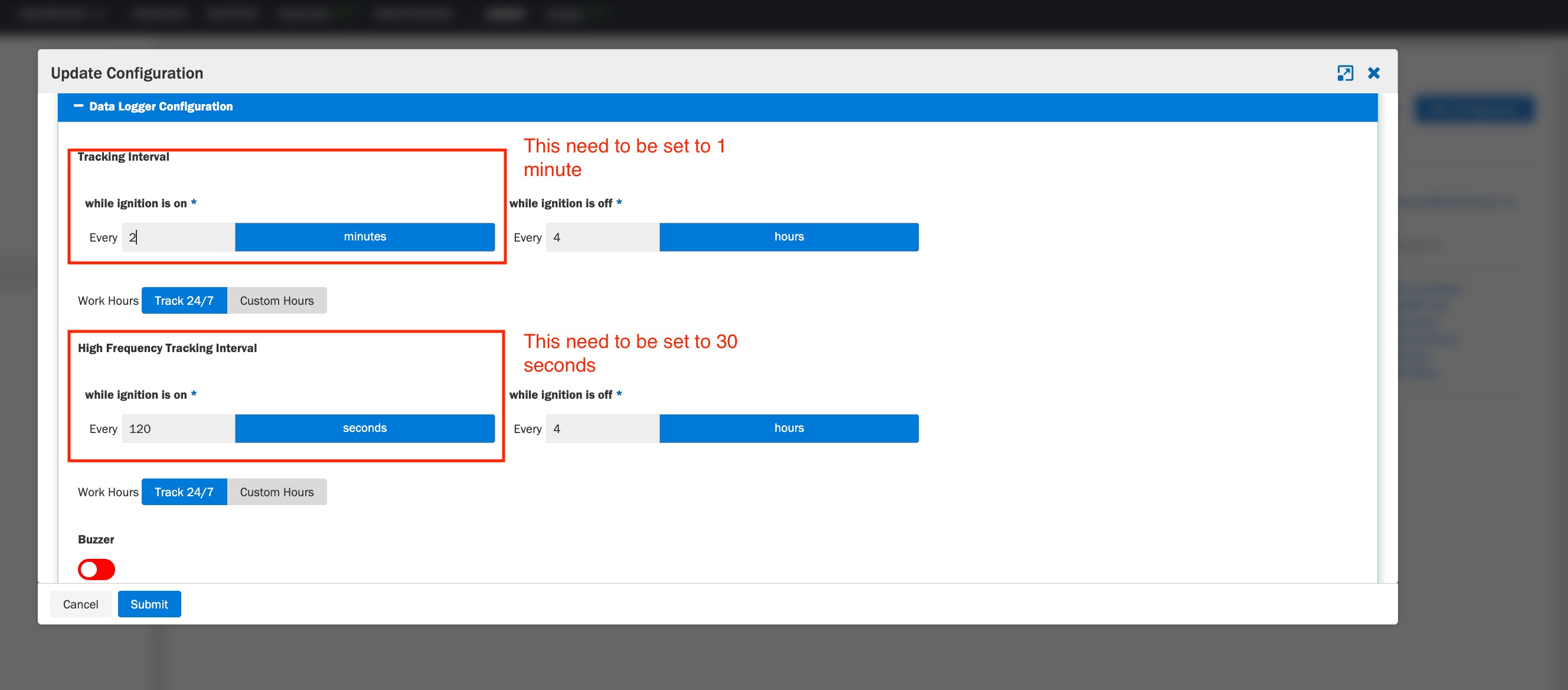
| Important: These configurations are view-only and cannot be modified. |
If these settings are not enabled:
- Contact Azuga Support at customercare@azuga.com or your CSM
- Share a screenshot of your current configuration
- Request enabling:
- 1-minute tracking
- 30-second high-frequency tracking
| Note: Additionally, use duration-based alerts under Admin > Alerts > Add/Edit Alert instead of instant alerts for more reliable detection. |
Was this article helpful?
That’s Great!
Thank you for your feedback
Sorry! We couldn't be helpful
Thank you for your feedback
Feedback sent
We appreciate your effort and will try to fix the article