With each new version of the app, Azuga comes up with some exciting features. The What’s new section in the application provides you with details of latest features and updates. It also presents you with the list of all features that have been made available, starting from the very first version of the app.
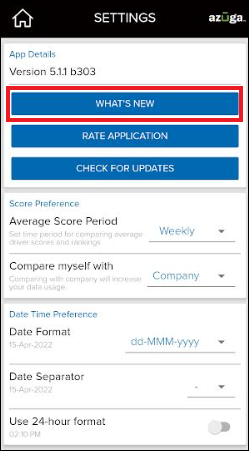
To view the What’s New page:
1. Tap on the Settings tile from your Dashboard.
2. Tap on What’s New, under App Details.
Was this article helpful?
That’s Great!
Thank you for your feedback
Sorry! We couldn't be helpful
Thank you for your feedback
Feedback sent
We appreciate your effort and will try to fix the article