This article provides a quick overview of OEM-Connected Telematics what it is, how it works, and how it compares to Azuga’s plug-in device.
What is OEM-Connected Telematics?
OEM-Connected Telematics is vehicle tracking that leverages telematics hardware installed by the original equipment manufacturer ("OEM") at the time of production. It eliminates the need for aftermarket GPS devices by using the technology already embedded in the vehicle.
With your consent, this data is securely shared from the manufacturer’s cloud to Azuga. You can then access all your fleet insights, such as vehicle health, trip history, and driver performance, right from the Azuga platform, helping you boost safety, cut costs, and streamline operations.
How does OEM-Connected Telematics Work?
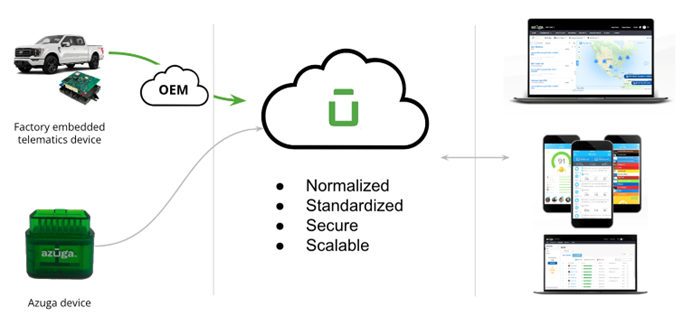
Here’s how the data flows:
- Vehicle Sends Data – The built-in telematics device gathers data as the vehicle is operated.
- OEM Cloud Receives It – That data is transmitted to the vehicle manufacturer’s secure cloud system.
- Azuga Connects with OEM – With your consent, Azuga securely accesses the data from the OEM cloud.
- Data Appears in Azuga – You see real-time vehicle insights in your Azuga dashboard, just like with an aftermarket GPS device, but without installing any hardware.
What Are the Benefits of OEM-Connected Telematics?
OEM-Connected Telematics offers a modern, more streamlined way to track your vehicles, without the hassle of managing aftermarket hardware. Since the telematics device is already built into the vehicle by the manufacturer, setup is quick, the data is reliable and secure.
| Benefit | Description |
|---|---|
| No Hardware Required | No need to install or manage aftermarket GPS devices everything is factory installed. |
| Saves Time | Onboarding is fast and easy with no installation delays or vehicle downtime. |
| Tamper-Resistant | Devices are built into the vehicle and hidden from view, making them hard to remove or disable. |
| Warranty Covered | Because the device is factory-installed, it’s protected under the vehicle’s OEM warranty. |
| Better Compatibility | OEM devices are made to work with specific vehicle makes and models, ensuring accurate data. |
| Future-Ready | As more vehicles ship with built-in telematics, your fleet will stay ahead of the curve with expanding data support. |
OEM vs Azuga GPS Devices (OBD II)
Both OEM-ConnectedTelematics and Azuga GPS devices (OBD-II dongles) are reliable solutions for collecting vehicle data, tracking in real time, and evaluating driver performance. The difference lies in how the devices are installed, configured, and how data is collected and managed.
An OBD-II dongle is an aftermarket device that plugs into a port inside the vehicle. In contrast, OEM-Embedded Telematics uses similar technology but is installed at the factory during vehicle manufacturing.
Undestanding Differences
The capabilities of the OEM telematics devices and the data they produce can be slightly different than what traditional plug-in data loggers like the Azuga GPS device support. Data may also differ between OEMs. Every effort has been made to ensure a seamless experience with the Azuga platform, but some differences do exist. Understanding any trade-offs that come with those differences is important when deciding whether to use OEM connections. That understanding is also important if you manage a mixed fleet (some OBD, some OEM).
The following tables summarize differences in data signals and events for each OEM and explain the impact on fleet operations and the user experience within Azuga applications.
Consideration | OBD (On-Board Diagnostics) | OEM (Original Equipment Manufacturer) | Impact |
Configurability of Data Emit Rate | Configurable data emit rate. Azuga/You can adjust frequency as needed. | Data emit rate not configurable. Emit rate determined by the OEM. However, the standard emit rate of OEM is typically higher than OBD. | Higher reporting frequencies result in more GPS breadcrumbs. This translates to improved real-time visibility and smoother history trails. |
| Thresholds that trigger Events such as Braking or Speeding, | Different threshold settings in comparison to OEM. Alerts, scores, rewards may vary. | Different threshold settings. Alerts, scores, rewards may vary. | The rate of certain types of events may vary. |
| Installation | Aftermarket hardware requires installation, which can mean extra costs and vehicle downtime. | Factory-fit hardware requires no installation. Enabling telematics can be completed right from your keyboard. | Faster time to value and lower operational overhead. |
| Device tampering | External hardware can be removed or become disconnected unintentionally. | Embedded telematics is a permanent part of the vehicle and is tamper resistant. | Fewer "offline" devices means greater visibility and reliability of telematics in your fleet. |
To see which of your vehicles are eligible for OEM Embedded Telematics, see the topic on Vehicle Compatibility or kindly reach out to your Azuga representative:
Email: customercare@azuga.com
Phone: (888) 790-0715
Next Step: Getting Started with OEM-Connected Telematics – Learn how to set up new vehicles or switch from OBD to OEM.
Was this article helpful?
That’s Great!
Thank you for your feedback
Sorry! We couldn't be helpful
Thank you for your feedback
Feedback sent
We appreciate your effort and will try to fix the article