To assign a driver to another vehicle:
- Log in to the Azuga Web application.
- Navigate to the Vehicles page present under the ADMIN tab. This page lists all the vehicles present in your account.
- Click the edit icon corresponding to the vehicle for which you wish to change the driver. A form containing the existing vehicle details appears on the page.
- Select a driver for your vehicle from the Associated Driver drop-down.
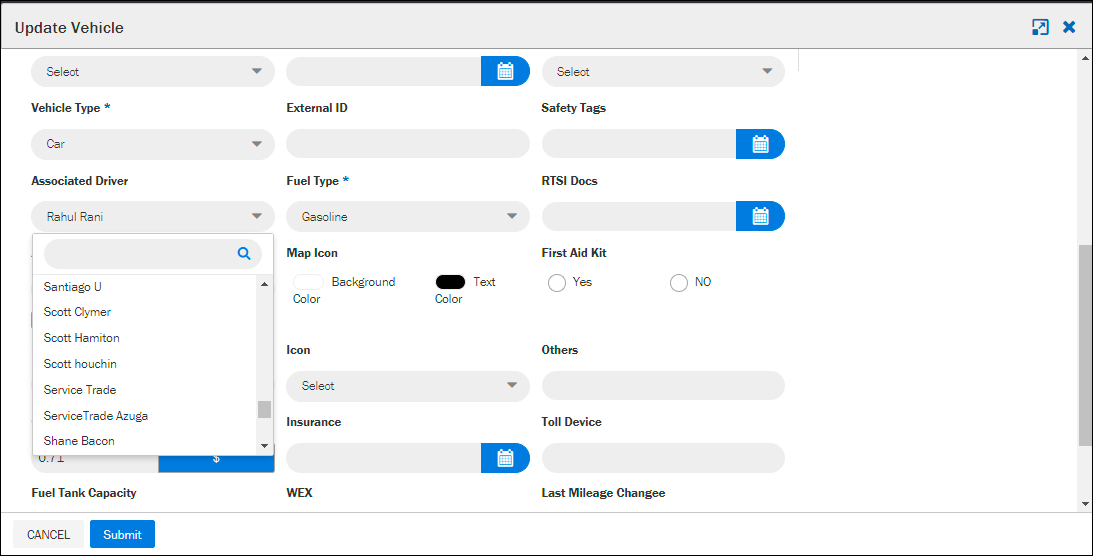
- Click Submit to update vehicle. The current driver of your vehicle will now get unpaired, and the new driver will be paired.
Was this article helpful?
That’s Great!
Thank you for your feedback
Sorry! We couldn't be helpful
Thank you for your feedback
Feedback sent
We appreciate your effort and will try to fix the article